If you are tired of faded colors, uneven painting, or lost details on your 3D prints, it is time to consider switching to a multi color 3D printer. Simply put, these machines allow you to achieve multi color effects in a single print. This eliminates manual painting, shortens delivery cycles, and significantly improves the detail of your models.
In this article, we will walk you through how multi color 3D printing works, three key reasons to upgrade, what to look for when buying, and practical tips to help you (whether you are a hobbyist, teacher, or small studio creator) make a smarter equipment decision.
Why Multi Color 3D Printing Is Becoming Popular at Home
Home users are no longer satisfied with dull, monochromatic models. They want a single 3d printer that can handle science projects for kids, home decor, and personalized holiday gifts. The rise of multi color 3D printing addresses three real needs: aesthetic upgrades (higher expectations for final looks), time savings (limited free time), and creative expression (the desire for a finished product rather than a semi-finished part that needs more work).
What Is a Multi Color 3D Printer?
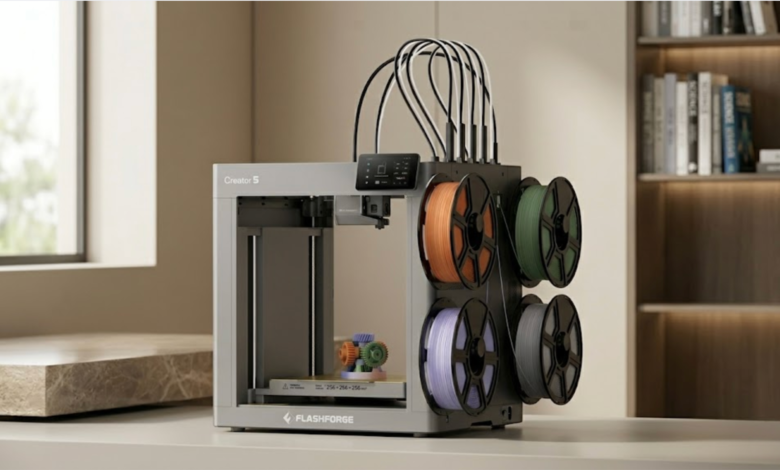
A multi color 3d printer is a device capable of switching or mixing multiple colors (or even different materials) within a single print job. For professional or high-demand scenarios, advanced systems like the 4 tool head 3D printer Flashforge Creator 5 offer multi-nozzle capabilities to streamline this process. Advanced systems like the Flashforge Creator 5 lead the industry with its 4 tool head system, allowing you to seamlessly print up to 4 colors or different engineering materials without the hassle of a single-nozzle filament swapper.
The table below compares the characteristics of three mainstream multi color methods:
| Technology | Switching Method | Color Limit | Filament Waste | Best For |
| Independent Filament System (IFS / AMS) | Single nozzle auto-switch | Usually 4 colors, up to 16 | Moderate (prime tower) | Home, education, hobbyists |
| Dual Extruder IDEX | Two independent nozzles | 2 colors | Very low | Multi-material engineering parts |
| Manual Filament Change | Manual switch after pause | Unlimited but tedious | Very low | Occasional experimenters |
Reason 1: Create Eye-Catching Prints Without Manual Painting
If you have ever tried painting a 10 cm character model, you know the pain of spraying, drying, masking, and repeating for the next color. Multi color printing makes color a part of the printing process instead of a post-processing burden.
Skip the Time-Consuming Painting Process
Hand-painting character models usually requires a lot of extra time, especially for masking, color separation, touch-ups, and waiting for paint to dry. In contrast, multi color printing moves the color assignment to the slicing stage. This significantly reduces post-processing work and gets your finished product ready for display or delivery much faster.
Get More Realistic Details in Every Print
Multi color printing presents color boundaries and decorative details more clearly, such as eyes on character models, mechanical markings, or contour lines on maps. With proper wipe settings and prime towers, color transitions are smoother and boundaries are cleaner. This results in a more stable look than manual touch-ups.
Pro Tip: Enabling Prime Tower and Wipe settings during slicing helps prevent color bleeding and keeps color boundaries sharp. It is recommended that the prime tower be the same height as the model and placed as close to it as possible to reduce travel time.
Reason 2: Save Time and Make 3D Printing Easier
Saving time on manual painting is just the beginning. What truly appeals to home users is the simplified workflow from start to finish. For creators looking for maximum efficiency, a multi-nozzle machine like the Flashforge Creator 5 integrates color and material switching directly into its independent tool heads. This design eliminates the constant filament retracting and purging found in single-nozzle systems, drastically shortening the print time.
Less Post-Processing Means Faster Results
Since the colors are finished during the printing phase, post-processing is usually minimal. Users only need to deal with supports, light sanding, and minor surface touch-ups. For those who frequently make gifts, models, or educational parts, this workflow change is often more valuable than just faster printing speeds.
Time Comparison (8 cm Complex Architectural Model):
| Task | Single Color + Manual Painting | Multi Color 3D Printing (Creator 5) |
| Design and Slicing | 30 minutes | 40 minutes |
| Printing Process | 5 hours | 6.5 hours |
| Painting and Waiting | 5 hours | 0 hours |
| Total Time | 10.5 hours | About 7 hours |
Reason 3: Unlock More Creativity for Everyday Projects
Multi color printing is not just about being faster. It is reshaping how users interact with 3D printing by shortening the distance between an idea and a physical object.
Mix Colors, Styles, and Textures
You can create gradient skies, dual-color logos, colored maps, and multi color assembly toys in one go. Many home users are using this to create Christmas decorations, custom nameplates, board game pieces, and other small but beautiful daily items.
Make Learning More Fun for Kids and Families
For families with children, colored cell models, solar systems, or maps can significantly boost interest and understanding. In STEM education, colored 3D models make it easier for students to distinguish structural layers and functional areas, making complex concepts more intuitive. For teachers, the value of colored models lies more in improving classroom readability and interaction.
Is a Multi Color 3D Printer Beginner-Friendly?
Many beginners worry that multi color models are complex or hard to tune. In fact, desktop multi color machines from the last two years are quite user-friendly. Most feature auto-leveling, automatic Z-offset, auto-filament loading, and one-click multi color templates in their slicing software.
Beginner-Friendly Quick Check:
- Auto-leveling ✓
- Color touchscreen guide ✓
- Filament recognition ✓
- Remote monitoring ✓
- Filament waste bag ✓
What to Look for Before Buying a Multi Color 3D Printer
Easy Setup and Intuitive Controls
Being able to complete your first print within 15 minutes of unboxing is a key standard for a family-friendly machine. Look for models with auto-leveling, auto-loading, and a color touchscreen interface.
Reliable Print Quality and Safe Design
An enclosed chamber prevents children from touching high-temperature parts and helps maintain stable temperatures when printing materials like ABS or ASA. HEPA carbon filtration, power loss recovery, and filament run-out detection are all great bonus features.
Filament Compatibility and Waste Management
Multi color printing naturally generates filament waste. Machines with good waste control offer features like waste estimation in the slicer, waste collection boxes, and color grouping functions to keep waste per part between 5 and 15 grams.
Practical Tips for Better Multi Color 3D Printing Results
Start With Simple Multi-Color Models
Recommended learning order:
- Dual-color keychains: Practice color switching and height alignment.
- Tri-color badges: Practice prime tower parameters.
- Four-color characters: Comprehensive application of all settings.
Store Filaments Properly
PLA is affected by environmental humidity. Long exposure can lead to poor surface quality or bubbles.
- Storage: Use a sealed moisture-proof box with silica gel desiccant to keep humidity below 15%.
- Calibration: Print a single-color temperature tower before starting a multi color print to confirm the best temperature for each filament batch.
Final Thoughts: Should You Make the Switch Today?
If you want your work to look like a finished product rather than just a sample, switching to a multi color 3D printer is a worthwhile step. It offers real time savings, higher completion levels, and greater creative freedom. From home entertainment to education, multi color printing is redefining the possibilities of desktop manufacturing. Visit the Flashforge website to explore how the Creator 5 4-tool-head 3D printer can elevate your workshop and redefine your production efficiency today.