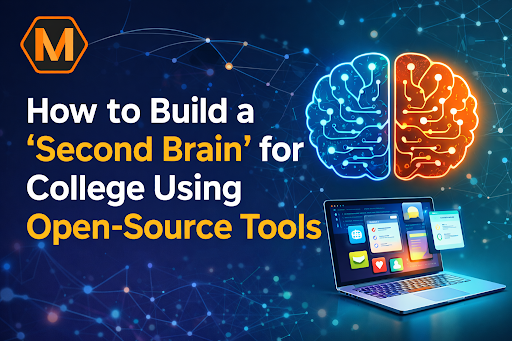
The modern college experience is defined by an overwhelming “information blizzard.” Between JSTOR PDF downloads, recorded lecture streams, and digital textbooks, the average student is expected to process more data in one semester than a 19th-century scholar did in a lifetime. Most students fall into the “Collector’s Fallacy”—the belief that saving a link is the same as learning the content. The result is a digital graveyard of unread files and high academic stress. Building a “Second Brain” is the technical solution to this biological limitation. It is a Personal Knowledge Management (PKM) system designed to store, connect, and retrieve academic insights, ensuring that your hard work during freshman year actually fuels your senior thesis.
Transitioning to a digital garden for college requires more than just a note-taking app; it requires a workflow that mimics how the human brain actually associates ideas through neural pathways. While many students initially look for a quick fix through university assignment help from established providers like myassignmenthelp, the long-term goal of a Second Brain is to build your own intellectual compounding interest. By using open-source tools, you ensure that you own your data forever—no subscriptions, no proprietary formats, and no risk of a company deleting your four years of hard work just because a credit card expired.
The Philosophy of the Digital Garden
The “Second Brain” concept, rooted in the centuries-old “Commonplace Book” tradition, suggests that our minds are for having ideas, not holding them. In a college context, this means moving away from “linear” filing (e.g., a folder named History 101 containing Week 1 Notes) and moving toward “networked” thought.
In a networked system, a note about the “Industrial Revolution” isn’t trapped in a History folder. It is linked to “Steam Engine” (Engineering), “Labor Laws” (Political Science), and “Carbon Emissions” (Environmental Science). This is how top-tier students achieve “Information Gain”—the ability to see connections that others miss.
The Foundation: Why Open-Source and Local-First?
Most popular productivity apps store your notes on their servers in a “black box” format. If the service goes down, your academic history is held hostage. Open-source tools like Obsidian, Logseq, or Zettlr use a “local-first” approach. Your notes are stored as simple Markdown (.md) files on your own hard drive.
| Feature | Legacy Cloud Method (Notion/Evernote) | Open-Source Second Brain (Obsidian/Logseq) |
| Data Ownership | Company owns the server; you “rent” access. | You own every file on your physical drive. |
| Privacy | Data can be scanned for ads or AI training. | 100% private; no one sees your research. |
| Format | Proprietary (Hard to export). | Universal Markdown (Readable by any app). |
| Offline Access | Often limited or buggy. | Works perfectly without internet. |
| Speed | Latency depends on your Wi-Fi. | Instant (Lightning-fast local indexing). |
Step 1: The “Capture” Phase (Building the Library)
The first stage of a Second Brain is the “Capture” phase. You need a centralized inbox for everything. If a piece of information doesn’t make it into the system, it doesn’t exist for your future self.
- Zotero for Research: This is the gold standard for open-source reference management. When you find a paper, Zotero saves the PDF and the metadata. Using a plugin like ZotFile, you can extract your highlights directly into your Second Brain.
- Logseq for Daily Logs: Logseq is a “block-based” outliner. It is perfect for rapid-fire lecture notes. Because it uses “bi-directional linking,” every time you mention a concept like “Market Equilibrium,” it automatically creates a backlink to every other time you’ve mentioned that term.
Step 2: From Notes to Knowledge (The Processing Phase)
Once you have the data, you must process it. This is where the Zettelkasten method (German for “slip-box”) comes in. Instead of writing long, rambling summaries, you create “Atomic Notes”—small, single-idea files.
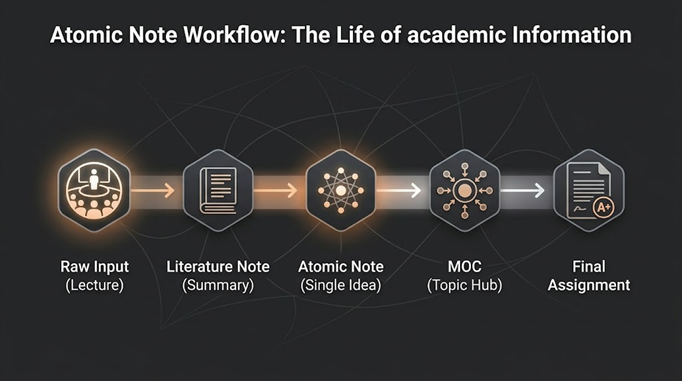
The Workflow Diagram:
[Raw Input: Lectures/Reading] —> [Literature Notes: Quick Summaries] —> [Atomic Notes: One Idea per Note] —> [MOCs: Map of Content/Topic Hubs] —> [Output: Essays/Thesis]
For students tackling complex technical degrees, the pressure to synthesize these notes into a cohesive project can be immense. If you are struggling with a specific technical project or feel overwhelmed by the sheer volume of data, seeking engineering assignment help can provide the structural clarity needed to organize your local files into a professional, high-scoring submission. This ensures that your deep technical research is matched by a polished final presentation.
Step 3: Searching the Brain with Technical Precision
As your Second Brain grows to thousands of files, a standard search bar is not enough. This is where the technical utility of open-source tools shines. Since your notes are local text files, you can use advanced utilities to query your entire academic history.
Imagine you are a senior writing a dissertation and need to find every instance where you mentioned “Ethical Frameworks” alongside “Artificial Intelligence” from your freshman, sophomore, and junior years. Using a Regular Expression (Regex) search allows you to scan 5,000 files in under three seconds.
Pro-Tip: Use the Regex string (?=.*Ethical)(?=.*AI) in your search tool to find files containing both terms regardless of where they appear in the text. This level of “Deep Search” is impossible in traditional folder structures.
Step 4: The “MOC” (Map of Content) Strategy
An MOC is a single note that acts as a table of contents for a specific topic. For example, your “Macroeconomics MOC” would link to your atomic notes on “Inflation,” “GDP,” and “Fiscal Policy.” This creates a “Hub and Spoke” model that makes navigating years of data effortless.
Step 5: The Synthesis (Turning Notes into High-Grade Assignments)
The ultimate goal of a Second Brain is “Output.” When it comes time to write an essay, you shouldn’t be staring at a blank cursor. Instead, you “assemble” your paper by pulling your existing atomic notes into a new outline. This method eliminates “Writer’s Block” because 80% of the paper is already written in the form of your previous notes.
Global Tone: Maintaining Your Digital Garden
Building a Second Brain is a global academic trend because it respects the “Human-First” style of learning. It acknowledges that we learn best through association, not memorization. To keep the system healthy, you should perform a “Weekly Review”:
- Inbox Zero: File any loose notes from the week.
- Link Building: Find 3 new connections between old notes.
- Refinement: Simplify complex notes so a “future you” can understand them later.
The “Human” Advantage in 2026
In an era where generic content is everywhere, the value of a student lies in their unique perspective. A Second Brain is a repository of your specific critiques of authors and your personal connections between subjects. When you write an assignment using your Second Brain, the “Information Gain” is obvious to professors. You aren’t just repeating a textbook; you are synthesizing a personalized web of knowledge.
If the technical setup of these systems feels overwhelming at first, remember that the goal is to reduce friction. Start small:
- Download Obsidian or Logseq.
- Create a folder for your current semester.
- Start using [[Double Brackets]] to link related concepts.
Conclusion: Future-Proofing Your Intellect
By the time you graduate, your Second Brain will be a private, searchable encyclopedia of everything you’ve learned. It transforms college from a series of temporary hurdles into a permanent intellectual asset. Using open-source tools ensures that this asset remains yours, free from corporate software cycles. Whether you are managing simple essays or complex datasets, a local-first PKM system is the most powerful tool a modern student can possess.
Frequently Asked Questions
What exactly is a “Second Brain”?
It is a digital system designed to store and connect ideas outside of your physical memory. By using specialized software to link related notes, you create a searchable database that grows more valuable as you add more research over time.
Why should I choose open-source tools over popular cloud apps?
Open-source options ensure you maintain total ownership of your data. Since your files are stored locally in a universal format, you aren’t at the mercy of subscription price hikes, privacy changes, or the risk of a company shutting down and deleting your work.
Do I need to be a programmer to use these systems?
Not at all. While some tools offer advanced technical features, the core workflow simply involves writing in plain text and using basic links to connect topics. Most platforms are designed with user-friendly interfaces that prioritize writing and organization.
How much time does it take to maintain the system?
A successful digital garden only requires a few minutes of “weeding” each week. Most of the building happens naturally while you take notes during lectures or research sessions, meaning the system saves you far more time during the writing phase than it takes to maintain.
About The Author
Min Seow is a content strategist and digital workflow expert dedicated to helping students optimize their research habits. Through the lens of MyAssignmentHelp, Min explores the intersection of open-source technology and academic excellence, empowering learners to take full ownership of their digital knowledge.